
How Douglas Arrests Enter Custody
Douglas Police works out of 300 14th Street, sometimes written as 300 West 14th Street. The main line is 520-364-2677, Records is 520-417-7501, and Investigations is 520-417-7506. The state Office of Economic Opportunity put the city's July 1, 2024 population at 16,059, second among the Cochise County cities covered here.
An arrest and a booking are related but different steps. When detention is needed, the arrested person moves into the county system run by the Cochise County Sheriff's Office. That system includes the main jail in Bisbee plus temporary sites in Sierra Vista and Willcox. The Douglas police building itself is not the jail. For a current location or release status, call the county jail at 520-432-7540.
Where Douglas Arrests Are Published
The city's official pages carry no named arrest roster, no daily booking table, and no mugshot feed. Each channel still has value, as long as you respect what it actually covers.
| Source | Purpose | Status |
|---|---|---|
| Douglas Police | Police services, contacts, incident records | Official city source |
| Douglas records form | Rolling calls entry, arrest history, report, or photo request | Official request route |
| CCSO Detention | Current county custody and facility confirmation | Official county source |
| Arizona VINE | Custody check and notifications | Official statewide route |
| Douglas Dispatch | Selected local reporting | Unofficial for custody; verify |
No single channel answers everything. A city report can exist even when there is no jail stay behind it. Someone can also be released or transferred before you ever run a custody check.
Douglas Rolling Arrest Log Gap
Douglas policy treats a daily rolling calls log and arrest history as public information. The city website lists no online URL for that log, though. That gap defines the access problem here. Treat the log as something to request from Records, not a live web feed. Police news posts and alerts do not amount to a full blotter either.
When you ask, name the date range and the exact product you want. A rolling calls entry logs activity. An arrest-history entry concerns an arrest record. An incident report holds the agency narrative. A county booking sheet documents jail intake. They are not interchangeable. A request naming the date, person, agency, incident number, and document type beats a vague ask for everything.
Find Someone Arrested in Douglas
- Begin with the Daily Arrest Report process for a same-day check.
- Call CCSO Detention at 520-432-7540 for current custody because no live official roster was located.
- Use VINELink Inmate Check and consider registering for custody alerts.
- Contact Douglas Police Records for the rolling calls entry, arrest history, or incident report.
- Request the county booking sheet or photo separately through Cochise NextRequest.
- Check the Arizona court case lookup for the filed case and later status.
Note down your source, search time, spelling, and record type before you start over. Transport and intake take time. A release or transfer can also pull someone out of a custody check. If nothing matches, the honest conclusion is that the person was not in that source at that moment.
Request Douglas Arrest Records
The Douglas public-record request form collects requester details, dates, agency or record type, a description, and delivery preferences. Delivery options run from paper and color copies to media, emailed documents, large requests, and court records. For an arrest, name the person and date window, then say which product you want: the rolling calls entry, arrest-history entry, incident report, or a photograph if one is held and releasable. The form sets no guaranteed turnaround or single fee for every product, so confirm both with Records at 520-417-7501. The official Douglas request form is the page to use.
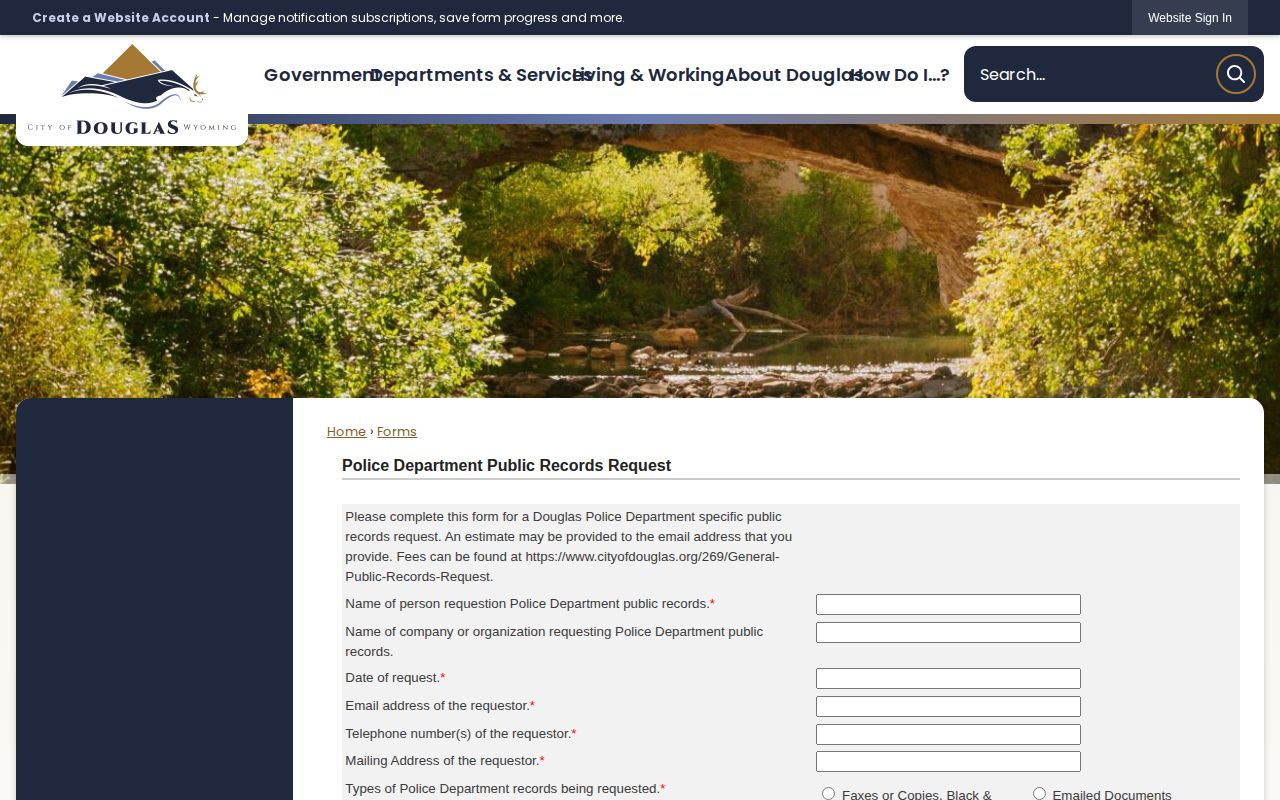
Its request choices help separate a city police document from county booking material.
Douglas Police Department
300 14th Street
Douglas, AZ 85607
Main: 520-364-2677
Records: 520-417-7501
Investigations: 520-417-7506
Douglas Police and County Records
Douglas Police holds incident reports its officers created. CCSO holds county detention intake. When you need a booking sheet or county booking photograph, file a second targeted request through the Sheriff Public Records page. Include the full name and spelling, the approximate arrest and booking time, the arresting agency, any case or booking number, and your preferred format.
County fees follow the CCSO fee schedule. A booking sheet runs $5, a color photo copy $5, and digital photos $20 per CD. Availability, redaction, and delivery still need confirming each time. Do not apply those county prices to a Douglas city request. And a record being public never means it appears online instantly, or that every photo exists to release.
Douglas Arrest News and Context
The Douglas Dispatch gives a local-news angle on selected incidents. It is an independent outlet, so its coverage follows its own editorial choices.

News adds context, but it runs on events, not on a complete county booking feed.
Check any reported arrest against Douglas Police records, CCSO custody information, VINE, and the court docket. Publication dates can lag behind arrest or booking dates. A story may also reflect what was known early in a case, before charges changed. Private booking aggregators carry the same risk and often run stale. Start with official sources every time.
Multi-Day Douglas Arrest Checks
Need a longer window than a single day? The Weekly Arrest Log chain covers multi-day searches for Douglas arrests. The Cochise County Media Report helps in a different way. It adds recent calls and neighborhood context, but it mixes in non-arrest events, and it carries no full set of names, charges, bond amounts, or booking photos. Treat it as background, not as a booking archive.
What about a rolling Douglas arrest log? The city recognizes one, but you must request it from city Records, since no public feed exists. There is no weekend catch-up schedule and no seven-day Douglas booking archive. The sheriff's office offers no inmate-lookup app either. For custody alerts, VINE is the system Cochise County actually uses; AlertSense handles emergencies, not jail events.
Confirm Douglas Arrest Outcomes
Charges can change after booking. A case may be reduced, dropped, or resolved entirely once it reaches a judge. So match the Douglas city report against the county booking record first, then turn to the court's own lookup. Superior Court filings that qualify can be pulled through eAccess, though sealed or restricted files stay off limits.
Track dates and sources as you go. The county booking-photo discussion covers why a records request works differently from browsing a gallery, and why you must name the exact holder of any photo you want.
Douglas Custody Records Stay Separate
Not every locked-up person shows up in a county search. A sentenced state prisoner sits in the Arizona Department of Corrections, Rehabilitation and Reentry system instead. Federal custody and immigration detention run on their own locators too. A hit in one system guarantees nothing in another, so check each system that fits the situation.
For Douglas itself, keep the chain short. Douglas Police holds the city report. CCSO handles booking and detention. VINE sends custody notices. The court settles the case. Working in that order cuts down on name-match errors and keeps straight whether a source describes an incident, current custody, or a filed case.
Skip any old advice about county inmate-list or mugshot tabs. CCSO shut those public tabs down in 2024, so no posting schedule applies anymore. Frame your Douglas request around a known date window and a named record instead. The records office can confirm whether it holds the city entry you want, while CCSO answers for county booking products.
Douglas Police Department Location and Directions
Public Record Search
Sponsored Results